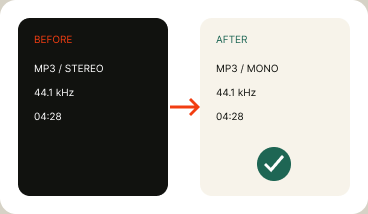
The interface should say where the file is read, what is decoded, which rule runs, and what the export contains.
ONE FILE → ONE LOCAL TASK → ONE NEW EXPORTSERVER PATH: NONE
BROWSER MEMORY / LOCAL WORKERSERVER BOUNDARY — NO FILE CROSSING IN LOCAL MODE
01SELECTChoose one file
02READLocal bytes + tags
03TASKInspect or edit
04PREVIEWShow delta / cuts
05EXPORTWrite a new file
01 / INPUTFILE PICKER / DRAG
02 / PROCESSBROWSER WORKER
03 / PREVIEWVISIBLE METHOD
04 / OUTPUTNEW LOCAL FILE
TECHNICAL NOTES / METHOD BEFORE PROMISE
Technical notes that prevent bad exports.
Each task needs a visible method, a non-goal, and a check before export.
01 / ID3 VERSION + FRAMES
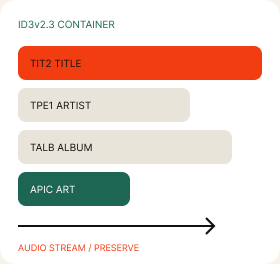
Write tags without rewriting the story.
Read the current version, map supported frames, and preserve the audio stream for metadata-only export.
CHECK / REOPEN THE FILE AND READ EVERY WRITTEN FRAME
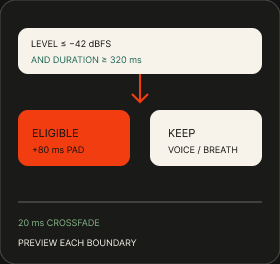
02 / SILENCE DECISION
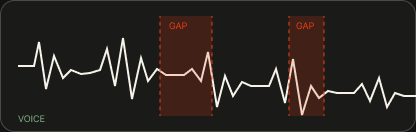
A quiet moment is not automatically a cut.
Threshold and duration decide eligibility. Padding and crossfade decide whether the edit sounds abrupt.
CHECK / AUDITION THE BOUNDARY, NOT JUST THE TOTAL SECONDS
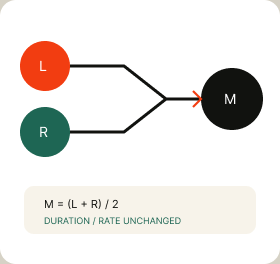
03 / CHANNEL MATH
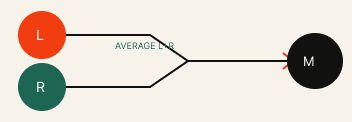
Mono is a rule, not a smaller stereo file.
Average L+R, keep one side, or duplicate mono to two channels. Name the operation.
CHECK / CHANNEL COUNT · DURATION · RATE · PEAK
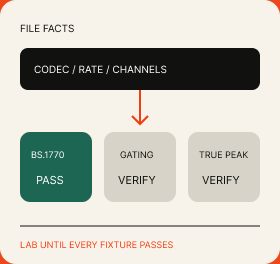
04 / ANALYZER + LUFS GATE
Inspect facts; validate measurements.
Codec facts are file inspection. LUFS becomes a promise only after BS.1770, gating, and true-peak fixtures pass.
CHECK / PUBLISH REFERENCE FILES AND TOLERANCE
FORMAT MATRIX / QUALIFIED SUPPORT
Format support should be specific.
A format name is not a guarantee. Container, codec, browser decode, write path, and reference tests all affect the status.
TARGETIntended production path
CONDITIONALBrowser or writer condition
VERIFYNeeds fixture coverage
FORMATCONTAINERMetadataROUTE STATUSSilenceROUTE STATUSChannelsROUTE STATUSInspectionROUTE STATUSBrowser QAROUTE STATUS
MP3ID3 tags / art
TARGETtags + artwork
TARGETdecode + export
CONDITIONALchannel rule
TARGETfile passport
VERIFYreference fixtures
WAVRIFF / BWF chunks
CONDITIONALtags + artwork
TARGETdecode + export
TARGETchannel rule
TARGETfile passport
VERIFYreference fixtures
FLACVorbis comments
CONDITIONALtags + artwork
CONDITIONALdecode + export
CONDITIONALchannel rule
TARGETfile passport
VERIFYreference fixtures
M4AMP4 atoms
CONDITIONALtags + artwork
CONDITIONALdecode + export
CONDITIONALchannel rule
TARGETfile passport
VERIFYreference fixtures
TARGET ≠ UNIVERSAL
Ship only after the named route’s fixtures pass.
NAME THE CONDITION
Browser codec, container writer, or frame coverage belongs on the page.
VERIFY IS A RELEASE CHECK
Keep files, expected output, tolerance, and browsers visible.
WORKFLOW STORIES / HANDOFF PATTERNS
Built for real audio handoffs.
Practical scenarios, not testimonials. Each ends with a check another person can repeat.
PODCASTER
Clean the pauses, then hand off the exact rule.
A producer removes long room-tone gaps, keeps breaths, and gives the editor the threshold and padding used.
ARCHIVIST / FIELD RECORDER
Repair the catalog before files move again.
An archive adds title, location, year, track, genre, and cover art while removing legacy Encoder notes.
QA HANDOFF
Send file facts with the export, not in a separate guess.
A QA reviewer compares codec, sample rate, channels, duration, and expected changes before accepting a handoff.
SCENARIOS / NOT CUSTOMER QUOTES / USE YOUR OWN FILES TO VERIFYMethod travels with the file. Use your own files to verify.
FAQ / TECHNICAL DISCLOSURE
Questions that matter before you choose a tool.
Privacy, method, output, and validation belong in the answer—not behind a vague “learn more” link.Privacy, method, output, and validation belong in the answer.
01Does Sonelora upload my audio?
For workspaces labeled Local Mode, file bytes stay in browser memory and no upload request is required. Read the route disclosure before choosing a file.
ROUTE-SPECIFIC PRIVACY PROMISE
02Can I edit ID3 tags without changing the audio stream?
The metadata-only path rewrites selected tag frames and preserves the audio stream. Reopen the export and verify every field.
VERIFY THE WRITTEN FRAMES
03How does stereo-to-mono conversion work?
Choose the rule: average L+R or keep one side. The result should show channel count, rate, duration, and peak.
NAME THE CHANNEL RULE
04How can silence removal be reproduced?
Record threshold, minimum duration, padding, and crossfade; then preview every boundary before export.
THE CUT RULE STAYS VISIBLE
05Is the LUFS meter production-ready?
It remains a lab until BS.1770, gating, true-peak, and tolerance fixtures pass across the supported browsers.
LAB UNTIL VALIDATED
READY WHEN THE METHOD IS VISIBLE
Start with the task you can verify.
Edit ID3 tags, remove silence, convert stereo or mono, or inspect file facts locally in your browser. Choose one job, see the rule, then export a new file.Edit ID3 tags, remove silence, convert stereo or mono, or inspect file facts locally in your browser.
NO SIGNUP · LOCAL ROUTES DISCLOSED · ORIGINAL UNTOUCHEDCHOOSE ONE JOB → SEE THE RULE → EXPORT A NEW FILENO SIGNUP · ORIGINAL UNTOUCHED